Shein Free Trial Center, Step by Step: Your Questions Answered
A friendly walkthrough of the Shein Free Trial Center: categories, applications, tracking status, submitting reports and fixing Failed reviews.
Advertisement
Wondering what actually happens after you tap a product in the Free Trial Center? Here's the deal: each item belongs to a campaign, and choosing one and sending a request only kicks things off.
Categories Worth a Look









The program's supplier decides which items appear, and at what time.
Heads-up: joining in doesn't lock in a spot for you.
Your request is handled entirely by Shein inside its own app, from the moment you pick an item to the final decision. If you're chosen, you'll try the product and share your review within the set time frame.
We're an independent guide with no affiliation to Shein: we don't ask for your information, take applications or decide who gets picked. Knowing how each step works helps you avoid missed deadlines and other snags.
Find your way to the trials area
First things first: log in and look for the Free Trial Center. In the app, it's Profile → More Services → Other Services → Free Trial Center. That screen lists every product with a campaign running right now.
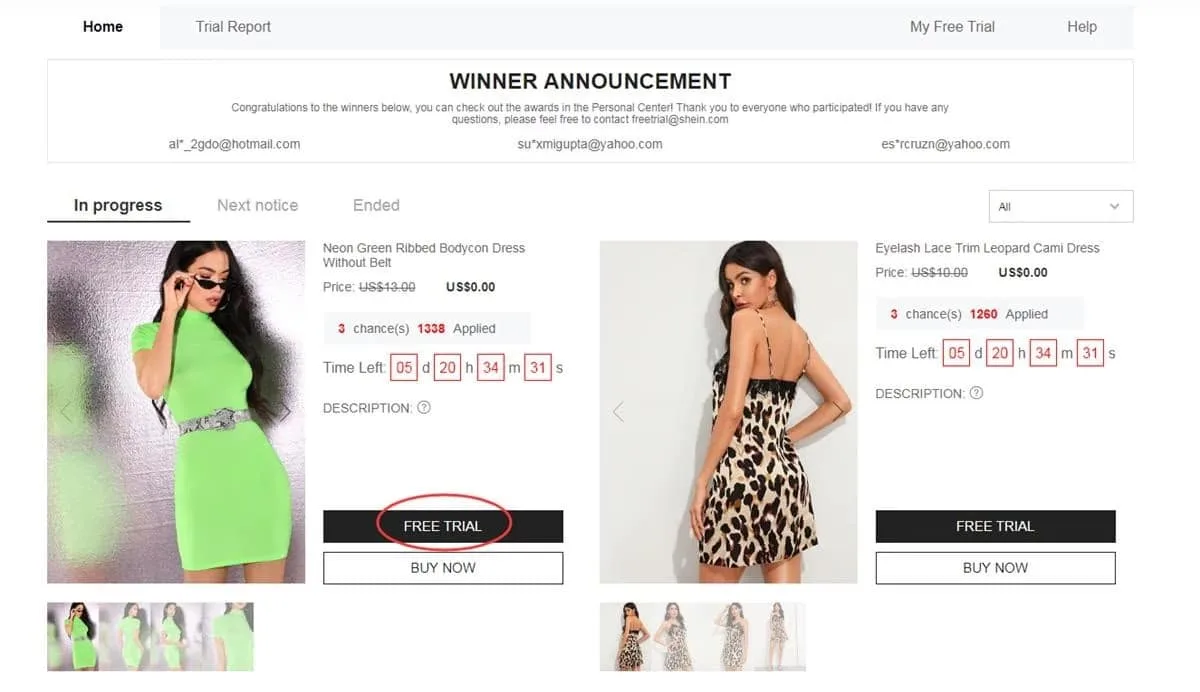
Jump in here to see which campaigns are open today
Choose what you'd love to test
Here's the deal: you've got up to 3 applications per week, and unused ones don't carry over to the next cycle. Before choosing, confirm the size and make sure your saved address sits inside the region your store serves.
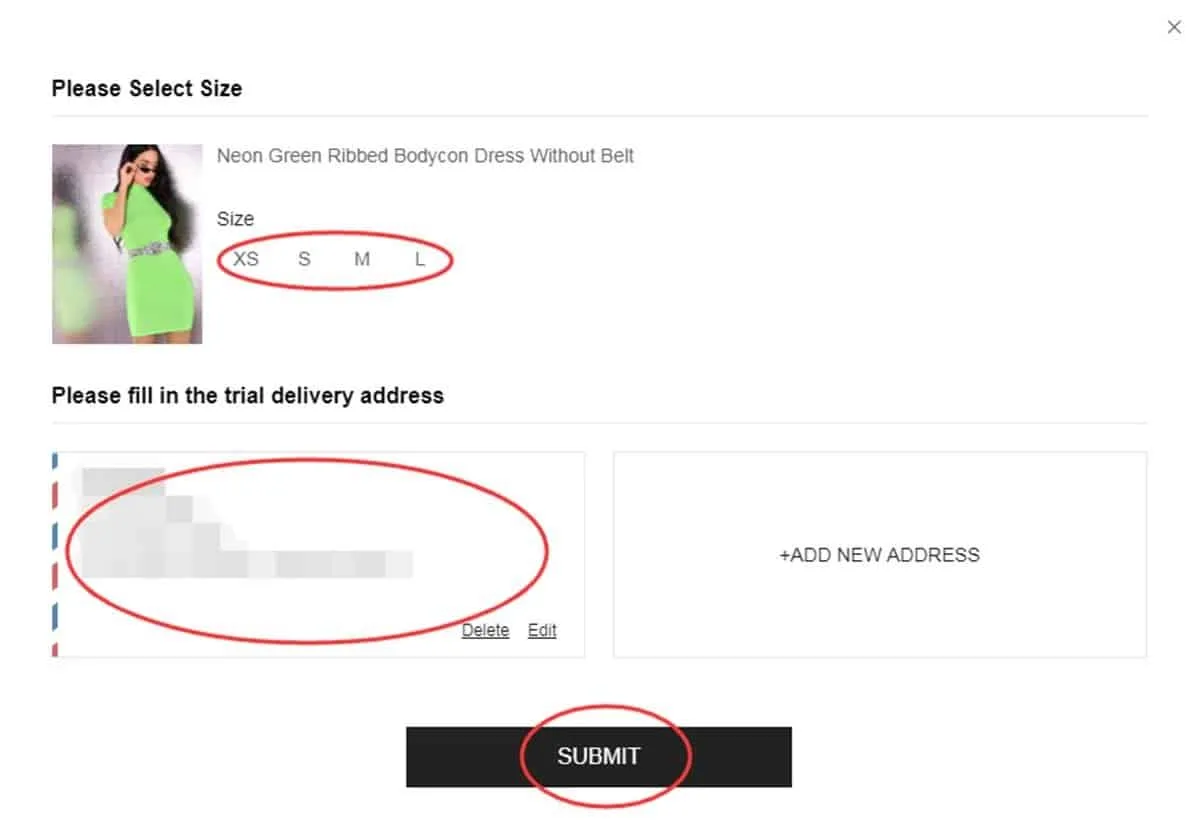
Look over your choice and delivery details before sending
Track where your request stands
Curious about the status? Check “My Free Trial” or “My Applications” after you send it. You'll usually hear back in about a week. Seeing “Approved” means you're in for that trial; “Failed” just means you weren't chosen on this round.
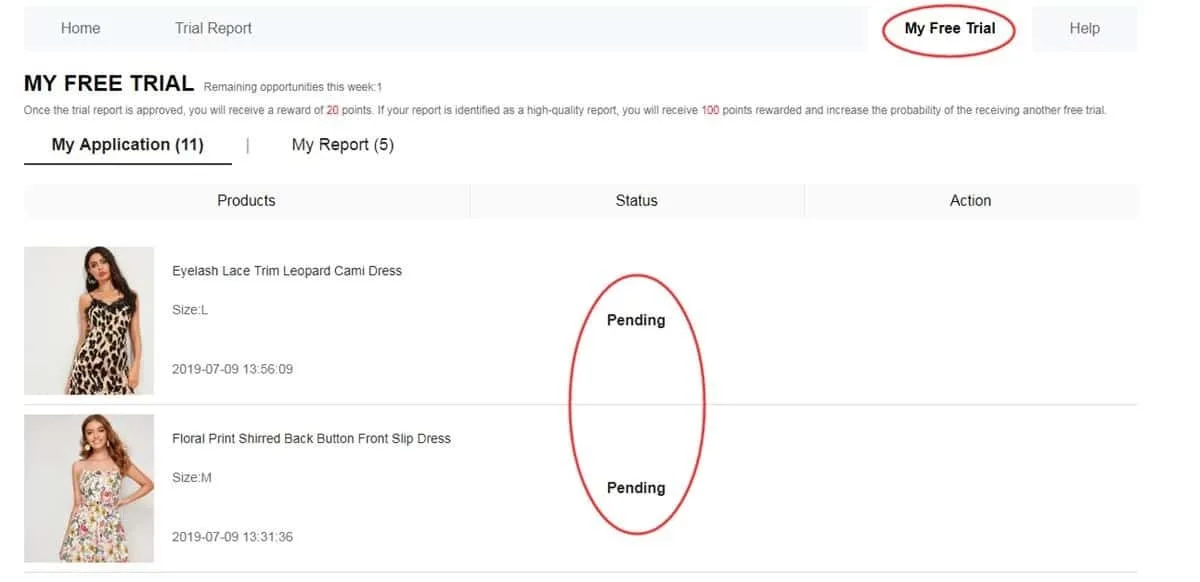
Your history shows which requests moved ahead
Give the item a proper test run
Got your approved package? Use it for real before writing a word. Notice the fabric, finish, comfort, fit, appearance and overall quality. Don't worry about sounding fancy — just describe your honest experience, add photos you snapped yourself and submit within the deadline of up to 10 days.
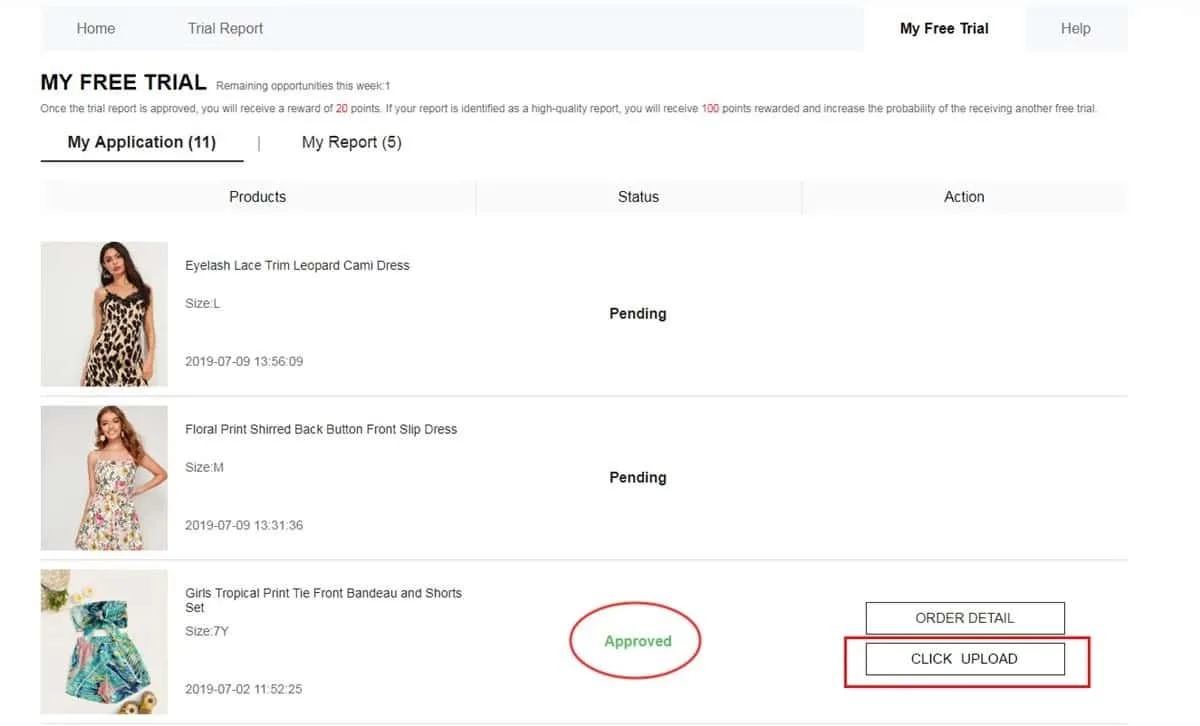
Share a detailed review backed by your own product photos
Check whether your report got the OK
Wondering how your review did? Pop into My Report after submitting. An approved report usually earns you 20 points, and if it's flagged as a “High-Quality Report”, there's a possible bonus of 100 more. Just remember, that bonus won't auto-approve you in future campaigns.
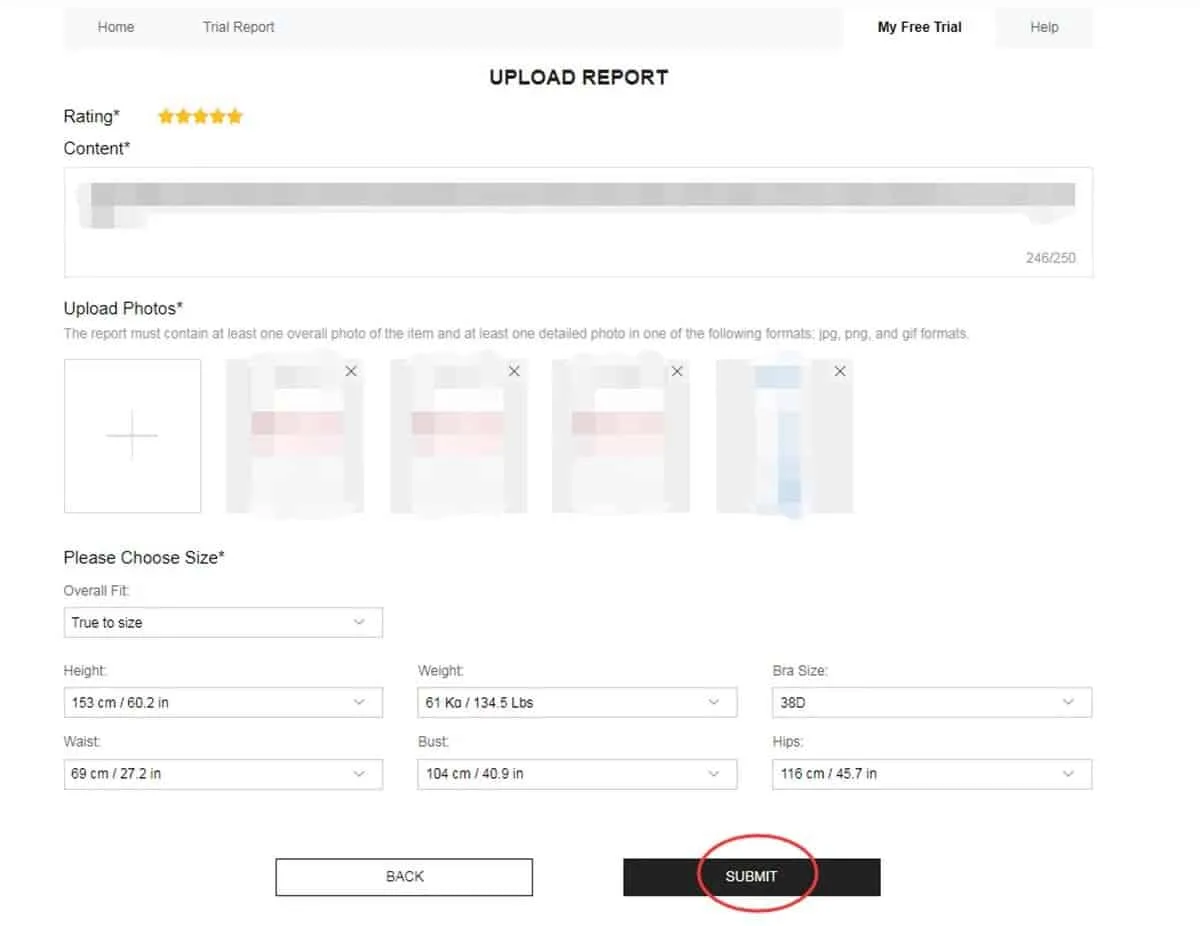
Your review result and the points it brought in live here
Got a second shot? Make the most of it
Don't worry if a review doesn't pass on the first try. If your report says Failed, check for the Rewrite button. Spotted it? Improve the wording, add helpful specifics and replace any photos that are dim, fuzzy or hide the product.
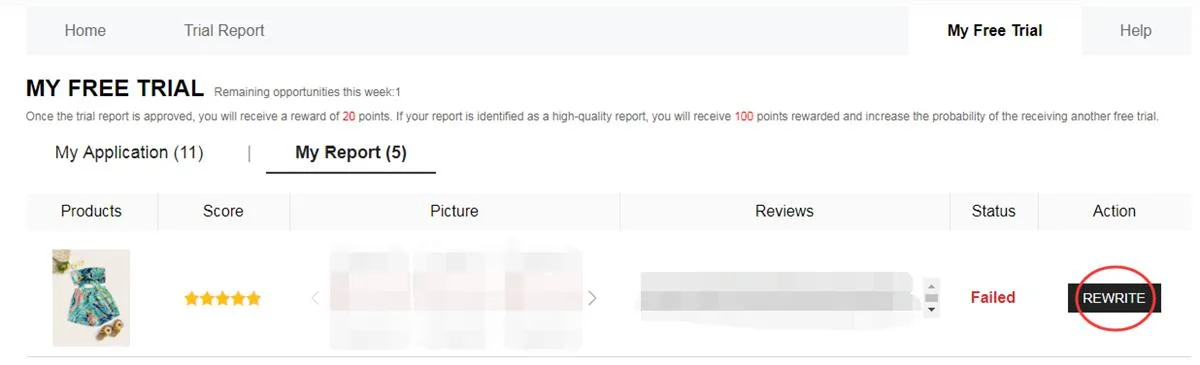
When available, Rewrite lets you revise your content and resubmit it
So, what happens from request to review?
First, you scroll through open campaigns and choose whatever grabs your attention. The catalog shifts constantly, so this week's items may be gone by the next round.
Then your request gets evaluated. Nothing's certain at this point — whether you receive the item hinges on the result that later pops up on your dashboard.
Approved? Great — the item heads to your registered address. After it lands, you're in the testing phase, so take a careful look at each of its features.
Last up is your report. Meeting the deadline counts, and so does writing useful, original content with photos that truly reflect what showed up at your door.
Which categories could pop up?
Items change depending on current stock, but here are segments you'll frequently find:
- Apparel: dresses, T-shirts, blouses, denim, workout gear, coats and more apparel.
- Beauty, self-care: cosmetics, skincare and items for your everyday self-care.
- Style extras: bags, shoes, fashion extras, jewelry and other style add-ons.
- Home and organizing: kitchen gadgets, decorations, storage solutions and items for every room.
Didn't get picked last time? That won't decide how your next requests turn out.
Every fresh round is a nice chance to review your details and apply with it all filled in right.
What turns a review into a useful one?
Good news: a strong report goes beyond “I liked it.” Aim to describe concrete details from your own use:
• Mention what you loved and what could be improved.
• Cover fit, fabric, finish, comfort and how it looks in person.
• Include your own well-lit photos, taken from angles that show the item clearly.
• Add tips that could help a shopper eyeing the same product.
Mistakes that might set you back
Wondering what to watch for? A fast double-check at each stage helps you sidestep these usual issues:
❌ Keeping important profile info incomplete or outdated.
❌ Using a delivery address outside the selected store's region.
❌ Confirming a product without carefully reviewing its size and listed specs.
❌ Submitting a thin report that never says how the item performed for you.
❌ Posting low-quality images where the product is tough to see.
❌ Missing the window of up to 10 days to submit your review.
❌ Passing up the chance to improve your report while Rewrite is offered.
❌ Entering info that doesn't line up with the real data required to join.
The program basics, in a nutshell
• Here's the deal: up to 3 applications per week, and choices you don't use aren't carried into the next cycle.
• Make sure your address belongs to the country or region tied to the store you requested from.
• Standard shipping is on the program, although customs rules and possible extra charges vary by destination.
• After your item arrives, there's a set time frame to complete and submit the required report.
• If a review gets turned down, the Rewrite option may show up, letting you adjust it before it's reviewed again.
• Providing fake info or abusing accounts may result in restrictions or being blocked from future trials.
• Following every step and completing your reports is part of what's asked of all trial participants.
Got questions? Answers below
Is there any fee to send an application?
Good news: requesting a product in the Free Trial Center costs nothing. Still, applying doesn't guarantee you'll be selected.
What's the weekly limit on requests?
You can ask for up to 3 products in each weekly cycle. Unused options don't carry over into the following week.
Does a rejection block future applications?
Nope. A request that wasn't chosen only applies to that single opportunity. Feel free to watch for fresh campaigns and keep applying whenever new products appear.
How do you know if your review needs edits?
Peek at the My Report section. If it shows Failed and Rewrite is available, you can adjust your content and resubmit.
Curious about each step in more detail?
Learn how to navigate the Free Trial Center, track your applications and craft a great review if you're chosen.


